How To Use Monke Mod Manager?
Learn how to use Monke Mod Manager step by step, from opening the tool to running mods correctly in Gorilla Tag.
Read MoreA complete guide to understanding the safety of Monke Mod Manager for Gorilla Tag PC VR players
Monke Mod Manager has become a popular tool among Gorilla Tag PC VR players who want to explore modded gameplay.
With mods offering new features, tools, and creative experiences, many players are curious but also cautious. One of the most common questions asked by beginners is whether Monke Mod Manager is actually safe to use.
Since it modifies game files and is not an official tool from the game's developers, concerns about security, bans, and system safety are understandable.
In this article, we will take a detailed look at Monke Mod Manager from a safety point of view. We will explain what "safe" really means in this context, discuss potential risks, and share best practices to help you use the tool responsibly.
When asking if a mod manager is safe, there are usually three main concerns. The first is whether the tool contains malware or harmful code.
The second is whether it can damage your game files or system.
The third is whether using it can get your game account banned.
Monke Mod Manager must be judged across all three areas to give a fair answer. Understanding these points helps players make informed decisions instead of relying on rumors or fear.
Monke Mod Manager itself is generally safe when downloaded from its official and trusted sources, such as its GitHub release page or our official Monke Mod Manager website.
The tool is community-built and open-source, meaning its code is visible and reviewed by other developers.
Some antivirus programs may flag the .exe file as suspicious. This usually happens because the tool interacts with game files, not because it contains malware.
These warnings are common with modding tools and are often false positives. As long as the file comes from a trusted source, the risk is very low.
Downloading Monke Mod Manager from random websites, file-sharing platforms, or unknown links increases the risk of getting modified or unsafe versions. This is one of the most important safety rules to follow.
Monke Mod Manager does not install background services, track user data, or make system-level changes outside the Gorilla Tag folder.
It works only with the game's files and related mod folders. Because it is a portable tool, it can be removed easily by deleting the file.
The manager also allows users to remove mods or restore the game to a clean state by deleting mod folders like BepInEx.
This makes it very unlikely to permanently damage your game or system. In most cases, if something goes wrong, removing the mods fixes the issue.
Here you can learn how to install Monke Mod Manager safely.
This is where many players feel uncertain. Monke Mod Manager itself does not ban players. However, how you use mods matters a lot.
Gorilla Tag allows mods in private or modded lobbies, but using mods in public lobbies breaks the game's rules. If mods are detected in public matches, players may be kicked or banned, regardless of how safe the mod manager is.
In simple terms, Monke Mod Manager is safe, but using mods in the wrong place is not. Responsible usage is the key to avoiding penalties.
Another important factor is the safety of the mods themselves. Monke Mod Manager often uses curated or commonly accepted mod lists, which lowers the risk of broken or harmful mods. Still, not every mod is guaranteed to be stable.
Some mods may be outdated, poorly coded, or incompatible with the latest game version. These issues can cause crashes or glitches, but they rarely harm your system. Avoid installing mods from unknown creators or unverified sources to stay safe.
Many safety issues happen due to user mistakes rather than the tool itself. Installing mods from random links, ignoring game rules, or mixing incompatible mods can cause problems.
Another common mistake is forgetting to update mods after a Gorilla Tag update. Outdated mods may stop working and cause errors, which some users wrongly blame on Monke Mod Manager.
To use Monke Mod Manager safely, always download it from official sources. Keep both the manager and your mods updated. Only use mods in private or modded lobbies. If something feels wrong, disable or remove the mod instead of forcing it to run.
Making backups or knowing how to remove mod folders also adds an extra layer of safety. These habits help you enjoy modding without stress.
Monke Mod Manager is generally safe for Gorilla Tag PC VR players when used correctly and responsibly. It does not contain harmful code, does not damage your system, and does not ban players by itself.
Most risks come from improper usage, such as installing untrusted mods or using mods in public lobbies.
When downloaded from official sources and used within the game's rules, Monke Mod Manager is a reliable and user-friendly tool that allows players to explore modded Gorilla Tag safely.
Yes, Monke Mod Manager is safe to download when obtained from official sources like its GitHub release page or the official website. It is community-built and open-source, meaning its code is visible and reviewed by other developers.
No, Monke Mod Manager does not install background services, track user data, or make system-level changes outside the Gorilla Tag folder. It is a portable tool that can be easily removed by deleting the file.
Monke Mod Manager itself does not ban players. However, using mods in public lobbies breaks Gorilla Tag's rules and can result in bans. Always use mods only in private or modded lobbies.
Some antivirus programs may flag the .exe file as suspicious because the tool interacts with game files. This is usually a false positive. As long as the file comes from a trusted source, the risk is very low.
To use Monke Mod Manager safely, always download from official sources, keep mods updated, only use mods in private or modded lobbies, and avoid installing mods from unknown creators or unverified sources.
Learn more about Monke Mod Manager
Learn how to use Monke Mod Manager step by step, from opening the tool to running mods correctly in Gorilla Tag.
Read More
Common reasons why Monke Mod Manager may stop working and the most effective solutions to fix the issues.
Read More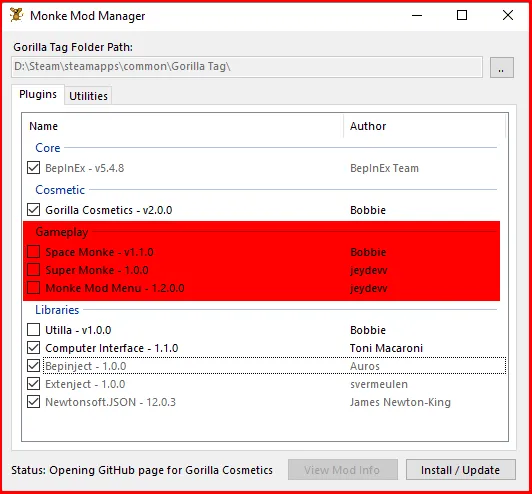
Get the latest version of Monke Mod Manager for Windows PC. Free, safe, and beginner-friendly mod installer.
Read MoreDownload Monke Mod Manager from the official source and enhance your Gorilla Tag experience
Download Now - Free